
If you run any kind of competitive community on Discord (Valorant customs, Smash Bros. weeklies, chess matches, poker nights), you've probably wished there was an easy way to track who's actually winning over time. Spreadsheets get messy. Manual tracking doesn't scale. And arguing about who's "the best" never goes anywhere productive.
That's exactly what an Elo leaderboard solves. The Elo rating system (originally designed for chess) gives every player a number that goes up when they win and down when they lose. Beat someone rated higher than you? You gain more points. The ratings naturally sort themselves over time into a fair ranking.
Here's how to get one running in your Discord server in about 5 minutes with Team Up's Discord leaderboard bot. The short version:
- Add the bot to your server.
- Record a match with
/record_match quick. - Post the leaderboard with
/leaderboard display_leaderboard. - Optionally, tune the rating settings and add tier roles.
Step 1: Add the Bot
Invite Team Up to your server. It needs basic permissions to send messages and manage roles (the role permission is only needed if you want automatic tier role assignments later).
Once the bot is in your server, you're ready to go. No setup wizard, no configuration files. The bot creates a leaderboard on the fly when you record your first match. If you'd rather name it first, you can also create one from the web dashboard.
Step 2: Record Your First Match
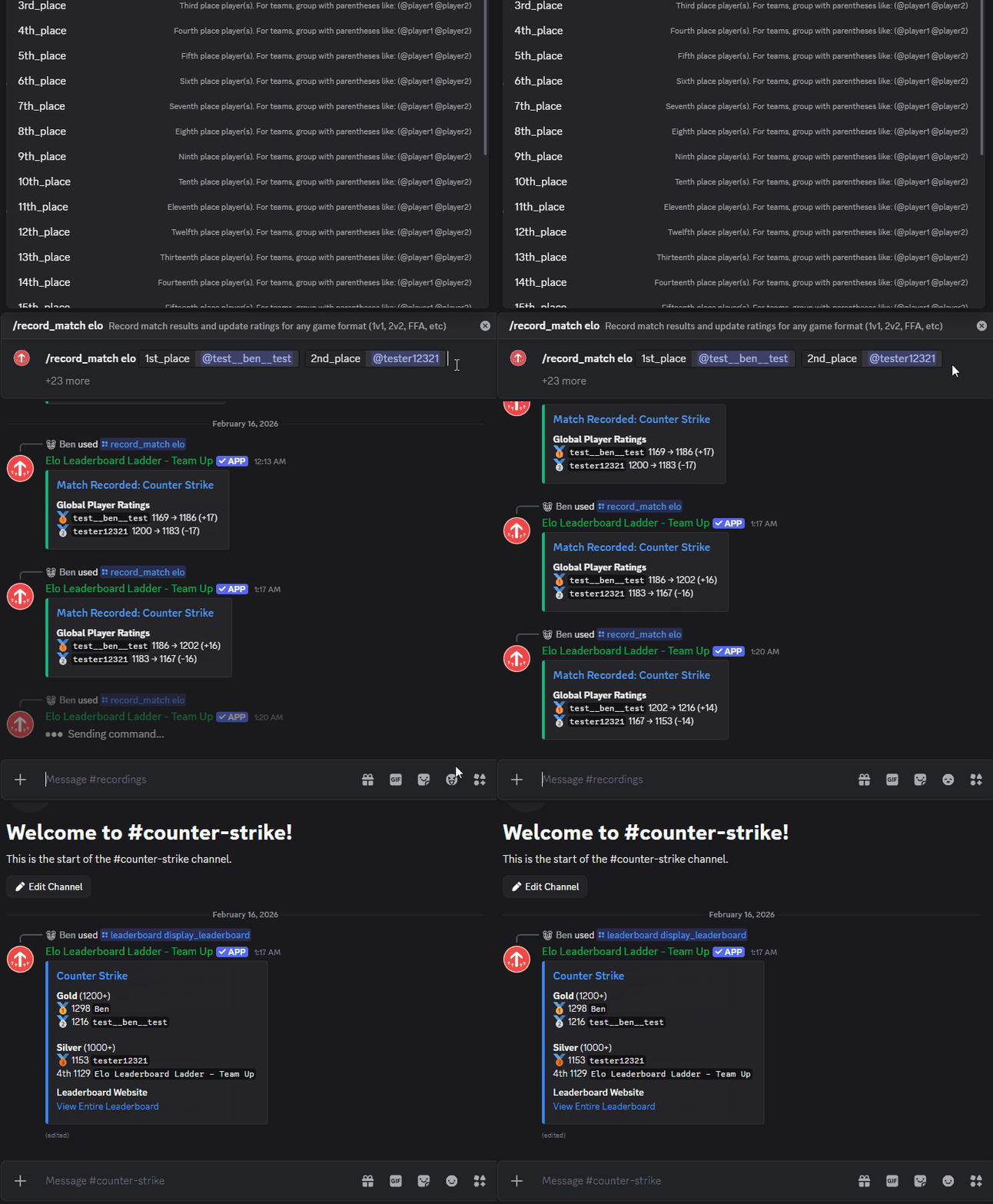
The fastest way to get started is with a quick 1v1:
/record_match quick opponent:@player2 winner:I won
That's it. The bot creates a leaderboard, assigns both players a default rating of 1200, calculates the Elo change, and records the result. You'll see a response showing the updated ratings for both players.
Other Match Formats
Team Up handles more than just 1v1s. Here are a few examples:
2v2 team match: group teammates with parentheses:
/record_match elo 1st_place:(@player1 @player2) 2nd_place:(@player3 @player4)
Free-for-all with 4 players: list placements in order:
/record_match elo 1st_place:@winner 2nd_place:@second 3rd_place:@third 4th_place:@fourth
Made a mistake? Undo the last match:
/record_match undo
You don't have to record every match by hand, either. Results from matchmaking queues, hosted lobbies and tournaments land on the same leaderboard automatically.
Step 3: Display the Leaderboard
Post a live leaderboard message that updates itself after every match:
/leaderboard display_leaderboard
This posts the leaderboard in the current channel. It's drawn as an image by default; add style:Text if you prefer a plain text embed. Other options let you pick what it ranks by (rank_by: rating, wins, win rate and so on), how many players it shows (limit) and its title. As new matches are recorded, the message updates itself. No need to re-run the command.
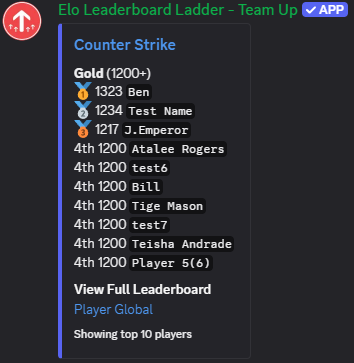
Every server also gets a public web leaderboard, with player profiles and rating history, that anyone can open without logging in. The leaderboard message links to it, so members can find the full rankings from Discord.
You can also post a live match history feed:
/leaderboard display_history limit:10
Step 4: Fine-Tune the Settings (Optional)
The defaults work for most communities, but you can customize everything. These settings live on the web dashboard, on each leaderboard's Rating Rules page.
K-Factor controls how volatile ratings are. A higher K-Factor means bigger swings per match, which is good for smaller communities where you want rankings to settle faster. A lower K-Factor suits large communities with lots of matches. 32 is a common starting point.
Matches for Ranking keeps new players off the leaderboard until they've played enough games. Set it to 5 and nobody shows up after a single lucky win.
Default Rating is where new players start (1200 unless you change it).
Not sure what a change will do? Try it in the Elo calculator first. For a full breakdown of every setting, check the configuration guide.
Bonus: Add Tier Roles
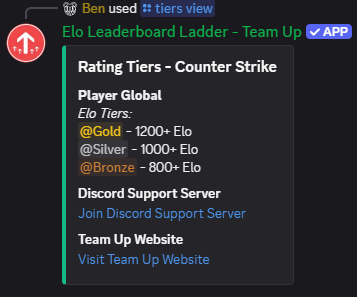
Want to reward your top players with visible Discord roles? Tier roles assign roles like "Diamond", "Gold" or "Bronze" based on rating thresholds. They're part of the Pro plan.
On the dashboard: Leaderboards → your leaderboard → Tiers (each tier takes a Discord role).
- Elo ≥ 1800 → @Diamond
- Elo ≥ 1500 → @Platinum
- Elo ≥ 1200 → @Gold
When a player's rating crosses a threshold, their role updates automatically. No manual work required. Players like having a visible rank in the member list and chat.
You can also create rank-based tiers (e.g., a "Top 10" role for the 10 highest-rated players) instead of rating thresholds. For how to pick thresholds and keep the top of the board active, see tier roles and rank decay.
What's Next
Once your leaderboard is running, there's a lot more you can do:
- Matchmaking queues: let players queue up and get matched into balanced games
- Multiple leaderboards: run separate rankings for different games or formats
- Web dashboard: manage your server, view match history, and configure settings from a browser
- REST API: build custom integrations with your leaderboard data
Curious how Team Up compares to other options? See our comparison of the best Discord bots for Elo and matchmaking.
The free tier gives you 50 matches per day and 3 leaderboards, which is plenty to get started. If your community grows and you need more, Pro starts at $1.99/month and adds automatic tier roles, custom URLs and higher limits.
Questions? Check the full tutorials or ask in our Discord community.